
In this article, readers will discover essential insights into golf cart instrument panel restoration, focusing on prevalent problems and effective solutions. From troubleshooting malfunctioning indicators to tips for enhancing visibility, this guide provides practical advice for anyone looking to address issues related to their golf cart dashboard repair. Whether you're a seasoned enthusiast or a new owner, you'll find valuable information to keep your golf cart display system in optimal condition.
Common Issues with Golf Cart Dashboard Displays
Golf cart dashboard displays are essential for providing real-time information about your vehicle's performance, battery status, and overall functionality. However, like any electronic system, they can encounter issues that may hinder their effectiveness. Below are some common problems you might face with golf cart dashboard displays, along with potential solutions.
1. Dim or Flickering Display
A dim or flickering display can be frustrating, as it may make it difficult to read important information. This issue can arise from:
- Loose Connections: Check the wiring and connections to ensure they are secure.
- Faulty Display Unit: If connections are intact, the display unit itself may need replacement.
- Power Supply Issues: Inspect the battery and voltage regulator for proper output.
2. Inaccurate Readings
Sometimes, the dashboard may provide inaccurate readings, which can lead to confusion while driving. Common causes include:
- Sensor Malfunction: The sensors that feed data to the display might be malfunctioning.
- Calibration Issues: Ensure that the dashboard is properly calibrated to avoid erroneous readings.
- Software Glitches: Resetting the dashboard or updating the software can often resolve these discrepancies.
3. Warning Lights Remain On
Warning lights on the dashboard can indicate various issues, and when they remain illuminated without cause, it can be alarming. Possible reasons include:
- Faulty Sensors: Sensors that are damaged may send false signals to the dashboard.
- Wiring Problems: Inspect the wiring harness for any signs of wear or damage.
- Software Errors: A reset or software update might be necessary to clear persistent warning lights.
4. Non-Responsive Touch Screen
In models equipped with touch screens, a non-responsive display can be a significant issue. This can stem from:
- Screen Damage: Physical damage to the screen can affect its functionality.
- Calibration Issues: The screen may require recalibration to respond correctly to touch.
- Software Bugs: Restarting the system or performing a factory reset can often resolve responsiveness issues.
5. Battery Indicator Problems
The battery indicator is crucial for monitoring the charge level. Problems with this feature may include:
- Incorrect Wiring: Ensure that the battery connections to the dashboard are correctly wired.
- Defective Battery: A failing battery can provide inaccurate readings, necessitating a replacement.
- Faulty Dashboard Component: If the indicator remains stuck, the dashboard component may need repair or replacement.
Understanding these common issues with golf cart dashboard displays can help you troubleshoot effectively and maintain optimal performance. Whether it’s a simple connection issue or a more complex sensor malfunction, addressing these problems promptly can enhance your golf cart experience.
Step-by-Step Guide to Troubleshooting Golf Cart Dashboard Problems
If your golf cart dashboard is not functioning as it should, follow this step-by-step guide to diagnose and fix common issues effectively. This approach will help you identify the problem and take the necessary steps to restore your dashboard to full functionality.
1. Inspect the Power Supply
Start by checking the power source of your golf cart. A weak or dead battery can lead to dashboard malfunctions.
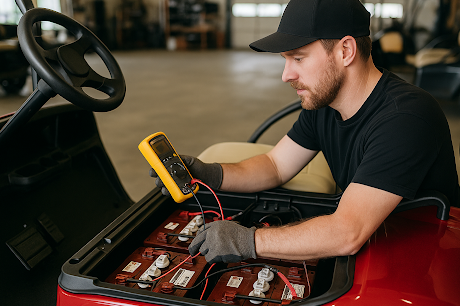
- Battery Condition: Ensure that the battery terminals are clean and free of corrosion. Use a multimeter to check the voltage; a healthy battery should read around 12.6 volts or higher.
- Connections: Verify that all connections are secure. Loose wires can disrupt power flow to the dashboard.
2. Check the Dashboard Fuses
Fuses protect your dashboard from electrical surges. If a fuse is blown, it may cause the dashboard to stop working.
- Locate the Fuse Box: Refer to your golf cart's manual to find the fuse box.
- Inspect Fuses: Remove each fuse and check for a break in the metal strip. Replace any blown fuses with the same amperage rating.
3. Evaluate Dashboard Components
Sometimes, specific components of the dashboard can fail, leading to issues.
- Speedometer and Odometer: If these displays are malfunctioning, inspect the wiring connected to the speed sensor. A faulty sensor may need replacement.
- Warning Lights: If warning lights are illuminated, check the corresponding systems (e.g., brakes, battery) for any underlying issues.
4. Test the Ignition System
An issue with the ignition can also affect dashboard functionality.
- Ignition Switch: Ensure that the ignition switch is operating correctly. If the switch is faulty, it may not send power to the dashboard.
- Starter Relay: Test the starter relay; a malfunctioning relay can prevent the dashboard from receiving power.
5. Reset the System
Sometimes, a simple reset can resolve dashboard issues.
- Disconnect the Battery: Remove the negative terminal of the battery for about 10 minutes to reset the electrical system.
- Reconnect and Test: After reconnecting, check if the dashboard displays are functioning correctly.
6. Seek Professional Help
If you’ve gone through these troubleshooting steps and your dashboard is still not operational, it may be time to consult a professional.
- Contact a Technician: A qualified technician can diagnose complex electrical issues that may not be apparent.
- Consider Replacement Parts: If certain dashboard components are damaged beyond repair, replacement parts may be necessary. Research options like the Curtis 1206MX controller, which is known for its reliability and can cost around $400.
By following this comprehensive guide, you can effectively troubleshoot common golf cart dashboard issues and ensure your cart remains in optimal condition for your golfing needs.
Essential Tools for Golf Cart Dashboard Display Repair
When it comes to addressing issues with your golf cart's dashboard display, having the right tools on hand is crucial for an efficient repair process. Below, we outline the essential tools you will need to effectively tackle common problems associated with golf cart dashboard displays.
1. Screwdrivers
A set of precision screwdrivers is vital for removing and securing the screws that hold the dashboard in place. Look for:
- Phillips Head Screwdriver: Ideal for most screws found in golf carts.
- Flat Head Screwdriver: Useful for prying open panels and accessing components.
2. Multimeter
A digital multimeter is indispensable for diagnosing electrical issues within the dashboard display. It allows you to:
- Measure Voltage: Check if the display is receiving the correct voltage.
- Test Continuity: Identify breaks in wiring that may affect functionality.
3. Wire Strippers and Crimpers
These tools are essential for repairing or replacing damaged wires. They help you:
- Strip Insulation: Prepare wires for connections without damaging them.
- Crimp Connectors: Securely attach new connectors to ensure reliable connections.
4. Soldering Iron
For more permanent fixes, a soldering iron is useful for:
- Soldering Wires: Creating strong, durable connections between components.
- Repairing Circuit Boards: Fixing broken traces on the dashboard’s circuit board.
5. Cleaning Supplies
Maintaining a clean workspace and tools can greatly improve your repair efficiency. Consider having:
- Isopropyl Alcohol: For cleaning electronic components without causing damage.
- Lint-Free Cloths: To avoid scratching screens or surfaces during cleaning.
6. Replacement Parts
Having access to common replacement parts can expedite the repair process. Key items to keep on hand include:
- Fuses: Essential for protecting the dashboard's electrical system.
- LED Bulbs: For replacing any burnt-out display lights.
By equipping yourself with these essential tools, you will be well-prepared to address any issues that arise with your golf cart dashboard display. Whether it’s a simple connection issue or a more complex electrical fault, having the right equipment at your disposal makes the repair process more manageable and effective.
When to Seek Professional Help for Golf Cart Dashboard Repairs
Knowing when to consult a professional for golf cart dashboard repairs is crucial for maintaining the functionality and safety of your vehicle. Below are key indicators that it may be time to seek expert assistance.
Signs Indicating Professional Assistance is Needed
- Persistent Error Messages: If your golf cart dashboard displays error codes or warning lights that don't resolve after basic troubleshooting, it's advisable to consult a technician.
- Inaccurate Readings: When the speedometer, battery gauge, or other indicators show incorrect information, this could signify a malfunction that requires professional diagnostics.
- Physical Damage: Any visible damage to the dashboard, such as cracks or broken components, can affect its operation and should be repaired by a specialist.
- Unresponsive Controls: If buttons or switches on the dashboard are unresponsive or sticky, it may be time for a professional to assess and repair the issue.
Complex Electrical Issues
Golf cart dashboards are often integrated with various electrical systems. If you encounter any of the following, professional intervention is recommended:
- Battery Malfunctions: If the dashboard fails to power on or experiences intermittent power issues, a professional can check the electrical connections and battery health.
- Faulty Wiring: Issues such as flickering lights or sporadic dashboard behavior may indicate wiring problems that require specialized knowledge to resolve.
Benefits of Professional Repairs
Engaging a professional for golf cart dashboard display repair can provide several advantages:
- Expert Diagnostics: Professionals have the tools and expertise to accurately diagnose issues that may not be apparent to the average user.
- Quality Assurance: Repairs conducted by qualified technicians often come with warranties, ensuring peace of mind regarding the longevity of the fix.
- Time Efficiency: Professionals can typically complete repairs more quickly than an individual attempting to troubleshoot complex issues on their own.
By recognizing these signs and understanding the benefits of seeking professional help, you can ensure your golf cart dashboard remains in optimal condition, enhancing your overall driving experience.
Preventive Maintenance Tips for Golf Cart Dashboard Displays
Maintaining your golf cart's dashboard display is crucial for ensuring accurate readings and extending the life of the system. By following these preventive maintenance tips, you can enhance the performance and longevity of your dashboard display, avoiding common issues that may arise.
Regular Cleaning
Keeping the dashboard display clean is essential for optimal visibility and functionality. Dust and grime can accumulate and obstruct readings. Use a soft, lint-free cloth to gently wipe the screen and surrounding areas. Avoid using harsh chemicals; instead, opt for a mild soap solution diluted with water.
Check Connections and Wiring
Frequent inspections of the wiring and connections are vital. Loose or corroded connections can lead to inaccurate readings or total display failure. Ensure that all connectors are securely fastened and check for any signs of wear or damage. If you notice frayed wires, consider replacing them to maintain reliable performance.
Monitor Battery Health
The health of your golf cart's battery directly affects the dashboard display. Regularly check the battery terminals for corrosion and clean them if necessary. Keeping the battery charged will help prevent voltage drops that can lead to display malfunctions. Invest in a quality battery maintenance charger, such as the NOCO Genius G3500, priced around $49.95, to maintain optimal battery health.
Software Updates
Many modern golf cart dashboard displays come with software that may require updates for optimal performance. Check the manufacturer’s website for any available updates and follow the instructions carefully to ensure your display is running the latest software version. This can resolve bugs and improve functionality.
Inspect for Moisture Damage
Moisture can be detrimental to dashboard displays. Regularly inspect the display for any signs of moisture buildup or condensation. If your cart is stored outdoors, consider using a weather-resistant cover to protect it from the elements. Installing a moisture-absorbing product, such as silica gel packs, in the storage area can also help mitigate moisture issues.
Use Protective Accessories
Investing in protective accessories can further safeguard your dashboard display. Consider using a dash cover designed specifically for your golf cart model. These covers shield the display from UV rays, reducing the risk of fading and damage over time.

Professional Inspections
Schedule routine professional inspections of your golf cart, focusing on the dashboard display and its components. Technicians can provide insights into potential issues and recommend necessary repairs, ensuring your display remains in top condition.
By implementing these preventive maintenance strategies, you can significantly reduce the likelihood of experiencing common dashboard display issues in your golf cart, ensuring a smooth and enjoyable ride on the course.
We would love to hear your thoughts and questions about Golf Cart Dashboard Display Repair! Your insights and inquiries not only enrich our community but also help others who may be facing similar challenges. Please feel free to share your experiences or any specific concerns you might have in the comments below. Together, we can navigate the intricacies of golf cart maintenance and ensure a smoother ride for everyone!
-
 harry Dudlek says:
 I have a new golf cart and the screen turned green and stopped working. I have number JYY090Kn35l2707A2. 20260127L. I have it out and dont know if you repair and what the price is.
 harry Dudlek
 Leave a Reply
Most things work but the screen doesn’t come so on it stays black , check and it’s getting power.