
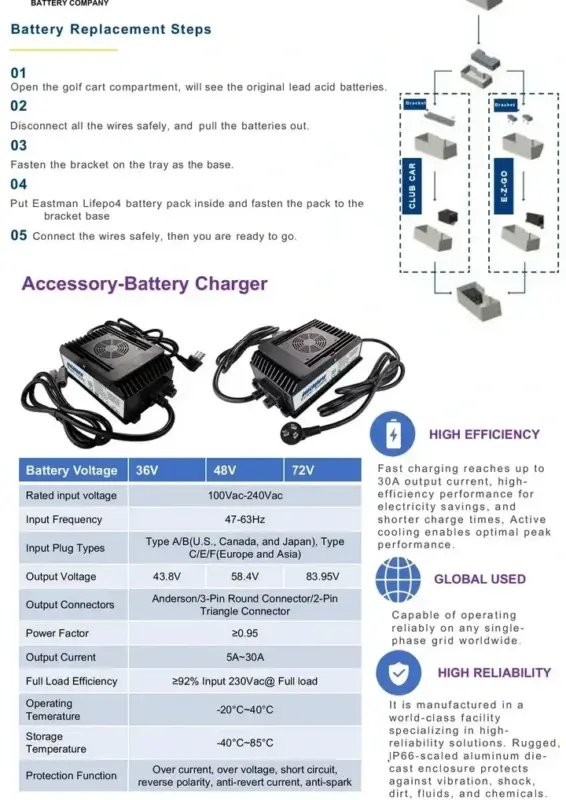
This article provides essential insights into golf cart battery charger upkeep and offers practical advice for ensuring your charger remains in optimal condition. Readers will discover key strategies for prolonging the lifespan of their charger, tips for safe usage, and maintenance practices that enhance performance. Whether you're a seasoned golfer or a new enthusiast, understanding golf cart battery charger care will help you maximize efficiency and reliability on the course.
- Essential Tips for Golf Cart Battery Charger Maintenance
- Common Issues with Golf Cart Battery Chargers and How to Fix Them
- Best Practices for Extending the Life of Your Golf Cart Battery Charger
- Understanding the Importance of Regular Maintenance for Golf Cart Battery Chargers
- Signs Your Golf Cart Battery Charger Needs Immediate Attention
Essential Tips for Golf Cart Battery Charger Maintenance
Maintaining your golf cart battery charger is crucial for ensuring optimal performance and longevity of your golf cart's battery system. Here are some essential guidelines to help you keep your charger in top condition.
Regular Inspection
Performing routine inspections of your charger can help identify potential issues before they escalate. Check for:
- Frayed Cords: Inspect the power cord and charging cables for any signs of wear or damage.
- Corrosion: Look for corrosion on the battery terminals and charger connections, which can impede charging efficiency.
- Overheating: Ensure the charger is not overheating during use, as excessive heat can damage internal components.
Cleanliness is Key
Keeping your charger clean can significantly enhance its lifespan. Regularly clean the exterior with a damp cloth, and ensure that vents are free from dust and debris to promote airflow.
Battery Maintenance
A well-maintained battery contributes to charger efficiency. Follow these battery maintenance tips:
- Water Levels: Regularly check and maintain the water levels in lead-acid batteries, ensuring they are above the plates.
- Charging Schedule: Stick to a consistent charging schedule to prevent over-discharge and prolong battery life.
- Temperature Monitoring: Avoid charging in extreme temperatures, as it can affect both battery and charger performance.
Use the Correct Charger
Always use a charger that is specifically designed for your golf cart's battery type. For instance, using a 48V charger on a 36V battery can cause serious damage. Verify compatibility before purchasing or using a charger.
Follow Manufacturer Guidelines
Adhering to the manufacturer's recommendations can help you avoid common pitfalls. Make sure to:
- Read the Manual: Familiarize yourself with the user manual for specific maintenance instructions.
- Warranty Information: Keep track of warranty details to understand what is covered regarding charger maintenance.
Store Properly
If you need to store your charger, ensure it is kept in a dry, cool place away from direct sunlight. This helps prevent moisture buildup and potential damage.
By following these essential tips for maintaining your golf cart battery charger, you can ensure a reliable and efficient charging experience that extends the life of your golf cart batteries.
Common Issues with Golf Cart Battery Chargers and How to Fix Them
Golf cart battery chargers are essential for maintaining the longevity and performance of your golf cart's batteries. However, like any electronic device, they can encounter problems. Here are some common issues and practical solutions to help you troubleshoot and resolve them effectively.
1. Charger Not Turning On
If your charger doesn’t power on, it can be frustrating. Here are some potential causes and solutions:
- Check the Power Source: Ensure that the outlet is functional. Plug in another device to verify.
- Inspect the Charger Cable: Look for any visible damage, such as fraying or cuts. If damaged, replacing the cable is necessary.
- Reset the Charger: Some chargers have a reset button. If applicable, press it to restore functionality.
2. Charger Overheating
Overheating can lead to reduced efficiency and potential damage. To address this issue:
- Ensure Proper Ventilation: Make sure the charger is placed in a well-ventilated area. Avoid using it in confined spaces.
- Check for Dust Accumulation: Dust can block ventilation. Clean the charger’s vents and surrounding area regularly.
- Limit Charging Duration: Avoid leaving the charger plugged in for extended periods after the batteries are fully charged.
3. Charger Not Fully Charging Batteries
If your charger isn’t completing the charging cycle, consider these troubleshooting steps:
- Inspect Battery Connections: Loose or corroded connections can hinder charging. Ensure that all terminals are clean and securely connected.
- Evaluate Battery Condition: Old or damaged batteries may not hold a charge. Conduct a battery test and replace if necessary.
- Check Charger Settings: Some chargers have adjustable settings. Ensure that the charger is set to the appropriate voltage for your battery type.
4. Indicator Lights Malfunctioning
Indicator lights are crucial for understanding the charger’s status. If they are not functioning:
- Examine the Charger’s Manual: Refer to the manual for troubleshooting steps specific to your charger model.
- Test with a Multimeter: Use a multimeter to check for electrical continuity. This can help identify if the issue lies within the charger.
- Seek Professional Repair: If the lights are still malfunctioning after your checks, consider consulting a technician.
5. Charger Making Unusual Noises
Unusual sounds can indicate underlying problems. Here’s how to address them:
- Identify the Source: Listen carefully to pinpoint where the noise is coming from. It could be a fan, transformer, or another component.
- Look for Loose Parts: Inspect the charger for any loose screws or components that may be rattling.
- Consult the Manufacturer: If the noises persist, contact the manufacturer for advice or service options.
By understanding these common issues with golf cart battery chargers and knowing how to fix them, you can ensure that your charging system operates efficiently. Regular maintenance and awareness of potential problems will help you avoid costly repairs and extend the life of your golf cart batteries. Remember, addressing issues promptly can significantly improve your charger’s performance and reliability.
Best Practices for Extending the Life of Your Golf Cart Battery Charger
To ensure that your golf cart battery charger operates efficiently and has a long lifespan, it’s essential to adopt specific practices that safeguard its functionality. Here are some key strategies to consider:
Regular Inspection and Maintenance
Performing routine checks on your battery charger can help identify potential issues before they escalate. Here are some maintenance tips:
- Visual Inspection: Look for signs of wear, such as frayed cables or cracked housing.
- Clean Connections: Ensure that all connections are free from corrosion. Use a soft cloth to clean the terminals.
- Check for Overheating: If the charger feels excessively hot during use, it may require professional attention.
Proper Storage Practices
Storing your charger correctly can significantly impact its longevity. Consider the following storage tips:
- Cool, Dry Location: Store your charger in a place that is not exposed to extreme temperatures or moisture.
- Protective Cover: Use a cover to shield the charger from dust and debris when not in use.
Use Compatible Chargers
Always use a charger that is specifically designed for your golf cart's battery type. This can prevent damage and ensure optimal charging efficiency. For example, a typical charger for a 48V golf cart battery system can range from $300 to $500, depending on the brand and features.
Understand Charging Cycles
Familiarize yourself with the appropriate charging cycles for your golf cart battery. Overcharging or undercharging can significantly reduce the lifespan of both the charger and the battery itself. Follow these guidelines:
- Charge After Use: Always recharge your battery after each use to maintain optimal performance.
- Avoid Overnight Charging: Unless your charger is equipped with an automatic shut-off feature, avoid leaving it plugged in overnight.
Monitor Battery Health
Keep an eye on your battery's performance as it can affect how well your charger functions. Regularly check for:
- Voltage Levels: Ensure that your battery is within the recommended voltage range.
- Fluid Levels: For lead-acid batteries, check and maintain fluid levels as needed.
By implementing these essential tips for golf cart battery charger maintenance, you can enhance the longevity and reliability of your charger, ensuring your golf cart remains ready for action whenever you are.
Understanding the Importance of Regular Maintenance for Golf Cart Battery Chargers
Maintaining your golf cart battery charger is crucial for ensuring the longevity and efficiency of both the charger and the batteries it powers. Regular upkeep not only helps in preventing costly repairs but also enhances performance, making it an essential practice for any golf cart owner.
Why Regular Maintenance Matters
Golf cart battery chargers are vital for the overall health of your golf cart's battery system. Here are a few reasons why consistent maintenance is important:
- Prolongs Battery Life: A well-maintained charger ensures that batteries are charged optimally, preventing overcharging and undercharging, which can lead to battery deterioration.
- Enhances Efficiency: Regular checks and maintenance help maintain the charger's efficiency, allowing for quicker and more effective charging cycles.
- Prevents Safety Hazards: Faulty chargers can pose risks, including electrical fires or battery leaks. Regular maintenance helps identify and rectify potential issues before they escalate.
Key Maintenance Practices
To keep your golf cart battery charger in top condition, consider implementing the following practices:
1. Routine Inspections
Conducting periodic inspections of your charger can help you catch wear and tear early. Look for signs of damage, frayed cords, or corrosion at the terminals.
2. Clean Connections
Corroded or dirty connections can impede the charging process. Regularly cleaning the terminals and connections with a suitable cleaning solution will enhance conductivity.
3. Monitor Charging Cycles
Keeping track of your charging cycles can provide insight into the health of both your charger and batteries. Ensure you are not overusing the charger, which can lead to premature failure.
Signs Your Charger Needs Attention
Being aware of the signs that indicate your charger may require maintenance is essential. Look out for:
- Inconsistent Charging: If your charger is not delivering a consistent charge, it may need servicing.
- Unusual Noises: Strange sounds during the charging process can indicate internal issues.
- Overheating: If the charger becomes excessively hot, it is crucial to disconnect it and assess for problems.
By understanding the significance of regular maintenance for your golf cart battery charger, you can ensure a reliable power source for your golf cart while extending the lifespan of your batteries. Implementing these practices will not only save you money in the long run but also enhance your overall golfing experience.
Signs Your Golf Cart Battery Charger Needs Immediate Attention
Recognizing when your golf cart battery charger requires immediate intervention is crucial for maintaining the longevity and performance of your golf cart. Ignoring these signs can lead to more significant issues down the line. Here are some key indicators to watch for:
1. Inconsistent Charging Behavior
If your charger shows erratic behavior, such as fluctuating lights or sounds, it may be time for a closer inspection. Look for the following:
- Intermittent Charging: The charger stops and starts during the charging cycle.
- Inconsistent Indicator Lights: Charging lights that do not follow a predictable pattern can indicate internal issues.
2. Unusual Noises
A properly functioning charger should operate quietly. If you hear strange sounds such as buzzing or clicking, it could signal a problem. Pay attention to:
- High-Pitched Whines: This could indicate electrical issues within the charger.
- Clicking Sounds: Repeated clicking can suggest that the charger is struggling to connect properly.
3. Overheating
If your charger feels excessively hot to the touch, it might be overheating. This is a serious concern that can lead to further damage. Look for:
- Heat Emission: If the charger is warmer than usual during or after use.
- Burning Smell: Any unusual odor can indicate overheating components.
4. No Power Output
If your charger is plugged in but the battery is not charging, it’s time to investigate. Consider the following:
- Power Light Off: If the indicator light does not turn on, the charger may be malfunctioning.
- No Charging Response: The batteries do not seem to charge even after several hours.

5. Physical Damage
Inspect the charger for any visible signs of wear or damage. Check for:
- Cuts or Frays: Damaged cables can disrupt the charging process.
- Burn Marks: Signs of burning or melting on the charger body can indicate electrical failures.
Recognizing these signs early can help you maintain your charger and, by extension, your golf cart’s battery health. Addressing these issues promptly can prevent costly repairs and ensure your golf cart is always ready for your next round on the course. Regularly practicing essential tips for golf cart battery charger maintenance will further enhance your charger’s reliability and performance.
We truly value your thoughts and insights! If you have any questions or opinions about Golf Cart Battery Charger Maintenance, we warmly invite you to share them in the comments. Your experiences and inquiries not only enrich our community but also help others navigate this important aspect of golf cart care. Let's engage in a fruitful discussion together!
Leave a Reply